


In today’s digital landscape, seeing a padlock icon in your browser’s address bar is more than a visual cue—it’s a fundamental promise of security and privacy. This symbol represents HTTPS, the secure protocol that powers trusted interactions online. But what exactly is HTTPS, and why has it become the non-negotiable standard for every website, from personal blogs to global e-commerce platforms? This guide delves into the mechanics, benefits, and critical importance of HTTP over SSL/TLS.
✅ Key Takeaways
Always check for HTTPS and a padlock before you type personal info online. This helps keep your data safe.
HTTPS keeps your data safe by hiding it. Hackers cannot read it. This helps keep what you do online private.
Trust websites that show an SSL certificate. The certificate proves the website is real. It shows the website is not fake.
Use HTTPS when you shop or bank online. This keeps your credit card and personal info safe.
Check your SSL certificate often. Update it to keep your website safe. This helps you avoid browser warnings.
✅ Understanding the Acronym: HTTP vs. HTTPS
At its core, HTTP (Hypertext Transfer Protocol) is the foundational set of rules for transferring web pages and data across the internet. However, it has a crucial flaw: it transmits data in plain text. This means anything sent or received—passwords, credit card numbers, personal messages—can be intercepted and read by anyone with access to the network path.
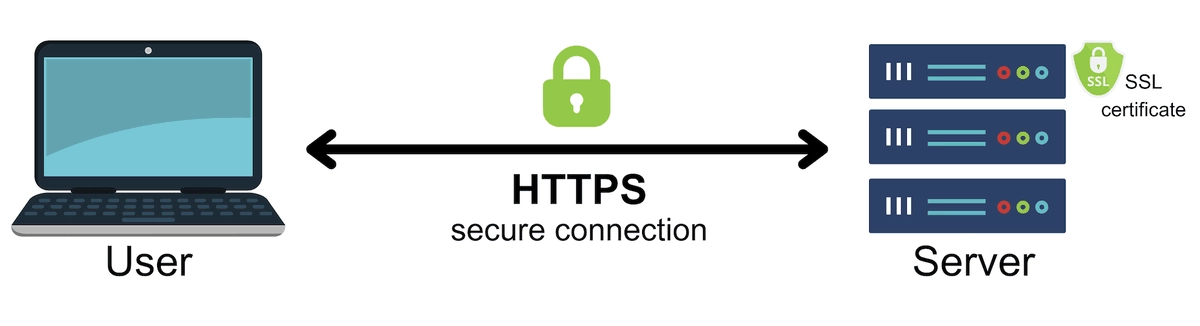
HTTPS (Hypertext Transfer Protocol Secure) solves this critical vulnerability. The "S" stands for Secure, meaning the communication is encrypted. HTTPS is essentially HTTP wrapped in a layer of cryptographic security. This security layer is provided by protocols called SSL (Secure Sockets Layer) or its modern, more robust successor, TLS (Transport Layer Security). The correct technical term is often "HTTP over TLS," though "SSL" remains in common parlance.
✅ The Core Technology: How SSL/TLS Encryption Works
The magic of HTTPS happens through an elegant process called the TLS handshake, which establishes a secure, encrypted connection before any actual application data is sent. Here’s a simplified breakdown:
Client Hello: Your browser (client) connects to a website's server and says "hello," presenting a list of supported cryptographic cipher suites.
Server Hello & Certificate: The server responds with its chosen cipher suite and sends its SSL/TLS certificate. This digital certificate, issued by a trusted Certificate Authority (CA), acts like a passport, verifying the server's identity and containing its public key.
Authentication & Key Exchange: The browser verifies the certificate's authenticity. Then, using the server's public key, it establishes a shared session key. This symmetric key is unique to this specific connection.
Secure Encrypted Session: All subsequent HTTP communication is encrypted and decrypted using this session key, creating a private tunnel safe from eavesdroppers and tampering.
This process ensures three vital pillars of security:
🔒 Encryption: Data is scrambled, protecting it from interception.
✅ Data Integrity: Data cannot be altered or corrupted during transfer without detection.
🛡️ Authentication: Verifies you are communicating with the intended website, not an imposter.
✅ HTTP vs. HTTPS: A Clear-Cut Comparison
Feature | HTTP (Insecure) | HTTPS (Secure) |
|---|---|---|
Protocol | Hypertext Transfer Protocol | Hypertext Transfer Protocol Secure |
Port | 80 | 443 |
Data Transmission | Plain text, easily readable | Encrypted, scrambled ciphertext |
Security | None. Vulnerable to eavesdropping, MITM attacks | High. Encrypted, authenticated, and tamper-proof |
SEO Impact | Negative ranking factor; may be flagged by browsers | A positive Google ranking signal; trusted by browsers |
User Trust | Browser displays "Not Secure" warnings | Displays a padlock icon; builds visitor confidence |
✅ Why HTTPS is Non-Negotiable: Benefits Beyond Security
SEO & Search Ranking: Google explicitly confirms HTTPS as a ranking signal. Websites without it are at a competitive disadvantage in search results.
User Trust & Credibility: The padlock icon and "Secure" label reassure visitors. Without HTTPS, modern browsers like Chrome prominently warn users that a site is "Not Secure," which dramatically increases bounce rates.
Performance (via HTTP/2 & HTTP/3): Modern, faster web protocols like HTTP/2 and HTTP/3 require HTTPS as a prerequisite. They offer significant speed improvements through multiplexing and reduced latency.
Data Integrity for Web Applications: Prevents intermediaries from injecting ads, malware, or altering content in transit.
Compliance: Essential for meeting standards like PCI DSS for handling payment data, GDPR for data protection, and many others.
For businesses leveraging robust web infrastructure, ensuring end-to-end security is paramount. This includes the application layer (HTTPS) and the physical data transfer layer. High-performance optical transceivers, like the LINK-PP SFP-10G-LR transceiver, are deployed in data centers to transmit this encrypted traffic reliably over fiber optic networks. The integrity and reliability of hardware like these LINK-PP optical modules ensure that the securely encrypted data packets reach their destination without physical layer errors, completing the chain of trust.
✅ The Physical Layer of Security: From Code to Light
While HTTPS encrypts data at the software level, its integrity relies on the physical infrastructure of the internet—the vast network of data centers and fiber optic cables. This is where high-speed optical transceivers play a critical, though often unseen, role.
These modules convert the electrical signals carrying your encrypted HTTPS data into pulses of light, transmitting them across continents with incredible speed and minimal loss. A failure or vulnerability at this physical layer could disrupt the secure channels we depend on. Therefore, using reliable, high-performance components is crucial for maintaining the security and performance benefits of HTTPS at scale.
In demanding environments where ultra-low latency and maximum reliability are non-negotiable—such as financial trading platforms or secure cloud service backbones—premium optics like the LINK-PP QSFP28 100G-PSM4 optical transceiver are essential. This module ensures that massive volumes of encrypted HTTPS traffic between servers are transmitted with precision, supporting the high-density, secure data center interconnects (DCI) that form the backbone of a trustworthy internet.
✅ Implementing HTTPS on Your Website: A Basic Checklist
Purchase an SSL/TLS Certificate: Obtain one from a trusted Certificate Authority (CA) or your web hosting provider (many offer them for free via Let's Encrypt).
Install and Configure the Certificate: On your web server (e.g., Apache, Nginx).
Force HTTPS Redirects: Configure your server to automatically redirect all HTTP traffic to HTTPS (using 301 permanent redirects).
Update Internal Links & Resources: Ensure all website links (images, scripts, CSS) use https:// URLs.
Verify with Tools: Use tools like SSL Labs Server Test to check your configuration and ensure no vulnerabilities exist.
Update Your Sitemap & Search Console: Submit your new https:// sitemap to Google Search Console to aid re-indexing.
✅ Conclusion: HTTPS is the Default, Not an Option
HTTPS has evolved from a recommendation for login pages to the absolute baseline for the entire web. It is the cornerstone of online security, privacy, and performance. Implementing it correctly protects your users, builds trust, fulfills compliance requirements, and improves your site's SEO visibility. In an era where data breaches are commonplace, deploying HTTP over SSL/TLS is the most basic and essential step any website owner can take.
Whether your data is secured by a cutting-edge TLS 1.3 cipher suite or transported by a high-speed LINK-PP optical transceiver in a core data center, the principle remains: end-to-end security is a multi-layered imperative. Start your move to a fully secure site today—your visitors, and your search rankings, will thank you.
✅ FAQ
What does the padlock icon mean in my browser?
You see the padlock icon when a website uses HTTPS. This icon shows your connection is secure. Your data stays private and safe from hackers.
What happens if a website does not use HTTPS?
You risk your information being seen by others. Hackers can steal your data. You should avoid entering personal details on sites without HTTPS.
What is a Certificate Authority?
A Certificate Authority is a trusted group that gives SSL certificates to websites. You trust these groups to check if a website is real and safe.
What is mixed content on a website?
Mixed content happens when a secure website loads some unsafe items, like images or scripts, over HTTP. This can make your connection less safe.
What should you do if you see a security warning?
You should stop and check the website address. Do not enter any personal information. Only continue if you trust the site and see the padlock icon.



