


In the world of computing, speed is everything. Whether you’re gaming, streaming 4K video, or processing massive datasets in a data center, the efficient movement of data is paramount. At the heart of this high-speed data transfer lies a crucial yet often overlooked technology: Direct Memory Access (DMA). This post will demystify DMA, explaining how it works, why it’s indispensable for modern performance, and its role in cutting-edge hardware like high-speed optical transceivers.
✅ Key Takeaways
Direct Memory Access (DMA) lets devices move data straight to memory. The CPU does not have to help. This makes your computer work faster and better.
There are different types of DMA. Burst Mode and Cycle Stealing are examples. Each type helps with different data transfer needs. This helps you pick the best one for your devices.
DMA lowers the work the CPU has to do. This lets your computer do many things at once more smoothly. It also helps with gaming, video streaming, and audio editing.
✅ The Core Concept: Bypassing the CPU Bottleneck
Imagine a large shipment of books (data) arriving at a library (your computer). Without DMA, the head librarian (the CPU) must personally receive every single box, unpack it, and place each book on the correct shelf (RAM). This is incredibly inefficient and ties up the librarian with mundane tasks.
Direct Memory Access is like hiring a dedicated logistics team. The librarian simply provides the delivery address and instructions. The team then handles the entire transfer autonomously, freeing the librarian to manage more critical tasks like running complex applications.
Technically, DMA is a feature that allows certain hardware subsystems (like storage drives, network cards, or graphics cards) to access the main system memory (RAM) independently, without requiring constant intervention from the Central Processing Unit (CPU). This offloads the CPU from the burdensome task of copying every byte of data, drastically improving overall system efficiency and performance.
✅ How Does DMA Work? A Step-by-Step Breakdown
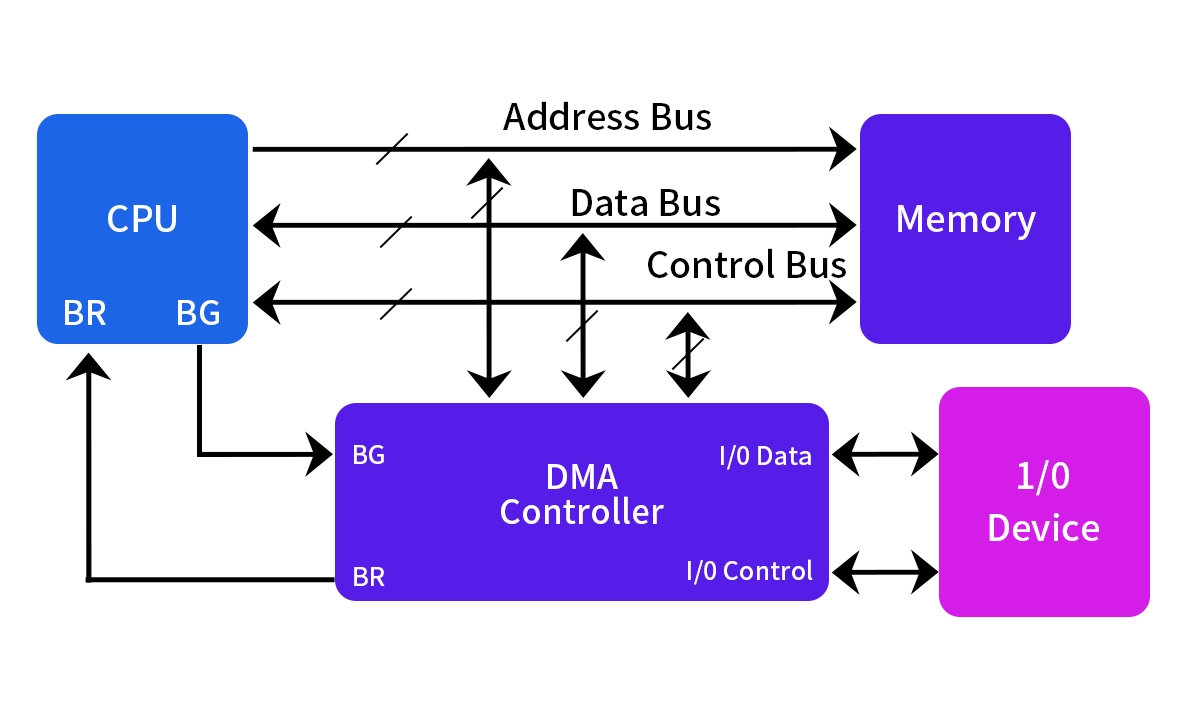
The DMA process is managed by a DMA Controller (DMAC), often integrated into modern chipsets or I/O devices themselves. Here’s a simplified sequence:
CPU Setup: The CPU programs the DMAC. It provides the source address (e.g., location on an SSD), the destination address (a block in RAM), and the amount of data to transfer.
Transfer Request: The peripheral device (e.g., a LINK-PP 400G QSFP-DD DR4 optical transceiver receiving network data) signals it is ready to transfer data.
DMA Takes Over: The DMAC requests control of the system bus from the CPU (a process called bus arbitration). Once granted, the CPU is temporarily disconnected from the bus.
Direct Data Movement: The DMAC manages the data transfer directly between the device and RAM. The CPU can proceed with other computations during this time.
Completion & Interrupt: Once the transfer is complete, the DMAC releases the bus and sends an interrupt signal to the CPU. The CPU then knows the data is ready for processing.
Two primary modes govern how the DMAC interacts with the bus:
Cycle Stealing: The DMAC "steals" bus cycles from the CPU when it is not using them. This is efficient but can slightly slow the CPU.
Burst Mode: The DMAC takes full control of the bus for the entire transfer. This is extremely fast for large blocks of data but can make the CPU wait (CPU stall).
The following table summarizes the key differences:
Feature | Without DMA | With DMA |
|---|---|---|
CPU Involvement | High. CPU copies every byte. | Low. CPU only sets up and is notified. |
Efficiency | Low. CPU is bogged down. | Very High. CPU & I/O work in parallel. |
Speed for Large Transfers | Slow. Limited by CPU bandwidth. | Very Fast. Uses dedicated controller. |
System Responsiveness | Can degrade under heavy I/O load. | Maintained, as CPU is free for critical tasks. |
Best For | Small, sporadic data transfers. | High-throughput data transfers like file loading, video capture, or network packet processing. |
✅ Why Is DMA Critical Today? Modern Applications
DMA is not a new technology, but its importance has exploded with the demands of modern computing:
High-Performance Computing (HPC) & AI: Moving massive training datasets between storage, GPU memory, and system memory relies on advanced PCIe DMA transfers.
Data Centers & Networking: Ultra-fast NVMe SSDs and 100/400 Gigabit Ethernet cards use DMA to achieve their rated speeds, ensuring low latency and high throughput. Technologies like RDMA (Remote Direct Memory Access) take this a step further, allowing direct memory access between servers over a network.
Multimedia & Gaming: Real-time video capture, audio processing, and streaming textures to a GPU are all dependent on DMA to prevent stutter and lag.
Consumer Devices: Even your smartphone uses DMA for tasks like saving photos, loading apps, and cellular data transfer.
✅ DMA in Action: The Critical Link to Optical Modules

This brings us to a key component in modern data centers and high-speed networks: the optical transceiver module. These modules, like the LINK-PP 400G QSFP-DD DR4, are the workhorses that convert electrical signals to light and back, enabling data transmission over fiber optic cables at staggering speeds of 400 gigabits per second.
So, how does DMA relate to an optical module? The module itself sits on a network interface card (NIC) or a switch port. Here’s the seamless collaboration:
The LINK-PP 400G optical module receives a stream of optical data and converts it to electrical signals.
These electrical signals (now data packets) are processed by the NIC’s specialized processor.
This is where DMA shines. The NIC uses DMA to instantly and efficiently place those incoming packets directly into the server’s main memory (RAM). Conversely, when the server sends data, the NIC uses DMA to pull packets from RAM for the LINK-PP module to transmit.
This entire process happens with minimal CPU overhead, enabling true line-rate processing at 400G. Without DMA, the CPU would be overwhelmed trying to handle each individual packet, creating a massive bottleneck and making such high-speed optical networking solutions impractical.
For engineers designing systems requiring maximum throughput, selecting components with robust DMA capabilities is non-negotiable. Partnering with a provider like LINK-PP, which ensures its high-density QSFP-DD and OSFP optical modules are designed for seamless integration with advanced NIC DMA engines, is a key step in building a low-latency, high-performance infrastructure.
✅ Conclusion: The Unsung Hero of Speed
Direct Memory Access (DMA) is a foundational pillar of modern computing performance. By enabling hardware components to communicate directly with memory, it liberates the CPU, reduces latency, and unlocks the full potential of high-speed devices—from NVMe drives to 400G optical transceivers.
As data volumes and speed requirements continue their relentless growth, the principles of DMA will remain central. Next-generation technologies like CXL (Compute Express Link) and wider adoption of RDMA over Converged Ethernet (RoCE) are evolutionary steps built upon this essential concept. Understanding DMA is key to understanding how our digital world manages to move information at the breathtaking speeds we’ve come to depend on.
✅ FAQ
What does DMA stand for?
DMA stands for Direct Memory Access. You use it when devices move data straight to memory without the CPU.
What devices use DMA in your computer?
You find DMA in hard drives, network cards, sound cards, and printers. These devices use DMA to move data quickly.
What happens if DMA is not used?
Without DMA, your CPU must handle every data transfer. This slows down your computer and makes it less efficient.



