


In modern networking equipment, the SFP Interface has become a standard method for connecting switches, routers, and servers to high-speed network links. Instead of relying on a fixed port type, an SFP interface allows network devices to use interchangeable transceiver modules, making it possible to support both fiber-optic and copper connections with the same physical slot. This modular design gives network engineers far greater flexibility when building scalable enterprise networks, data centers, and telecommunications infrastructure.
Many network devices include dedicated SFP ports alongside traditional Ethernet ports. These ports are commonly used for switch uplinks, long-distance fiber connections, and high-bandwidth network aggregation, where reliability and transmission distance are critical. By simply inserting different types of SFP modules, administrators can adapt a device to different media types, speeds, and deployment environments without replacing the hardware.
However, people new to networking often have several questions about this technology. For example, many wonder whether an SFP port is the same as an Ethernet port, why some networks prefer SFP over RJ45, or what practical advantages SFP interfaces provide in real-world deployments. Understanding these differences is essential for choosing the right network architecture and avoiding common compatibility or performance issues.
In this guide, we will clearly explain how SFP interfaces work and how they compare with traditional copper networking. After reading this article, you will understand:
what an SFP interface is and how it functions
the purpose of SFP ports in modern network devices
the differences between SFP and RJ45 interfaces
common applications of SFP interfaces in enterprise networks and data centers
practical troubleshooting tips for SFP connectivity issues
Whether you are a network engineer, IT administrator, or technology buyer evaluating network hardware, this article will help you better understand the role of SFP interfaces and how to choose the right connectivity solution for your network.
☀️ What Is an SFP Interface?
A Small Form-Factor Pluggable (SFP) interface is a modular networking interface used in switches, routers, and other network equipment to support interchangeable transceiver modules. Instead of integrating a fixed network port such as RJ45 directly onto the device, an SFP interface provides a slot that accepts removable SFP modules, allowing the same hardware to support different transmission media and speeds.
In practical networking environments, the SFP interface enables devices to connect using either fiber-optic cables or copper Ethernet cables, depending on the inserted module. This modular architecture is one of the reasons SFP technology is widely adopted in enterprise networks, data centers, and telecommunications systems.
In simple terms, the SFP interface is the slot, while the SFP module is the pluggable transceiver inserted into that slot to enable the physical network connection.
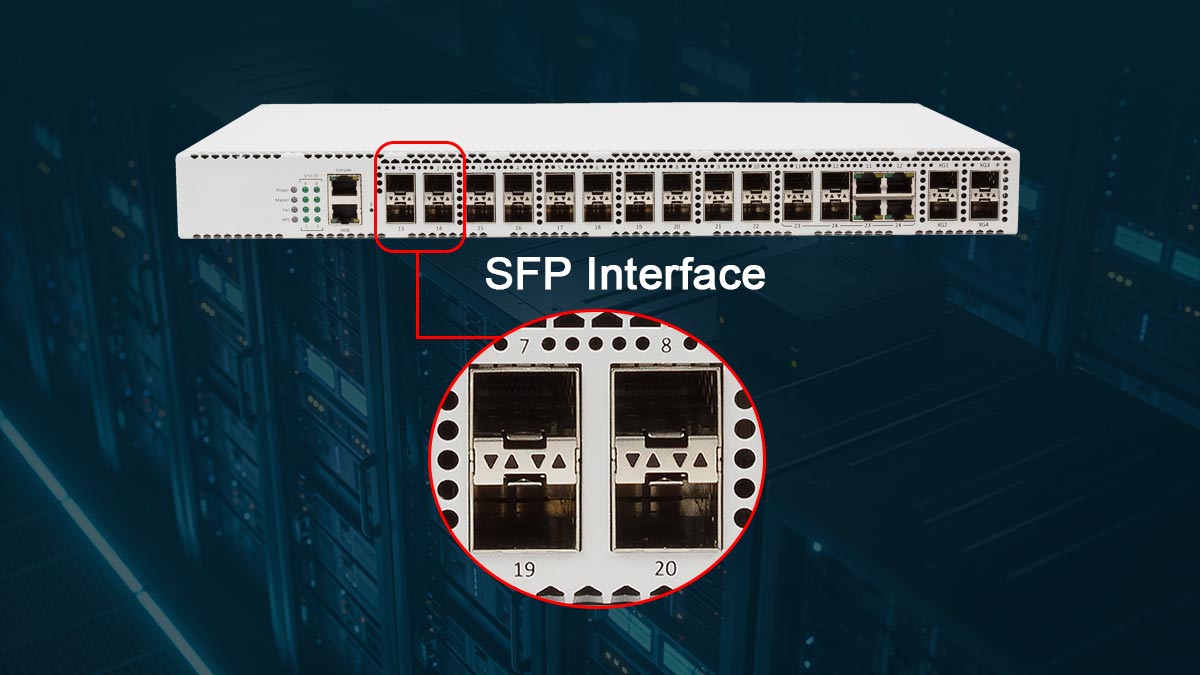
Definition of Small Form-Factor Pluggable (SFP)
The Small Form-Factor Pluggable (SFP) is a compact, hot-pluggable transceiver standard used to connect networking equipment to optical fiber or copper networking cables.
The SFP standard was developed to replace larger transceiver formats such as the Gigabit Interface Converter, offering a much smaller footprint while maintaining similar functionality. Because of its compact design, network manufacturers can include more high-speed interfaces on switches and routers.
Key characteristics of SFP technology include:
Hot-swappable design – modules can be inserted or removed without shutting down the device
Modular connectivity – supports multiple transmission types with the same interface
Compact size – allows higher port density on network hardware
Flexible speeds – commonly used for 1G Ethernet and extended into higher-speed variants such as SFP+
Because of these advantages, SFP has become one of the most widely used interface formats in modern network infrastructure.
How an SFP Interface Works
An SFP interface works by providing a physical slot on a networking device that accepts a compatible SFP transceiver module. Once inserted, the module converts electrical signals from the device into the appropriate transmission medium.
The process typically works as follows:
The networking device sends electrical data signals to the SFP slot.
The inserted SFP module converts the signal into optical signals for fiber transmission or electrical signals for copper Ethernet connections.
The signal travels through the network cable to the receiving device.
The receiving SFP module converts the signal back into electrical data for processing.
Because the module handles signal conversion, the same SFP interface can support many connection types, including:
single-mode fiber links
multimode fiber connections
RJ45 copper Ethernet links
This flexibility allows network administrators to easily adapt equipment to different network architectures without replacing the switch or router.
SFP Interface vs. Traditional Network Interfaces
Traditional network interfaces, such as fixed RJ45 Ethernet ports, are permanently integrated into a device and support only one physical connection type. While these ports are simple and cost-effective, they lack the flexibility of modular interfaces.
The SFP interface provides several advantages over fixed network ports:
1. Modular connectivity
Different SFP modules can support different media types, including fiber and copper.
2. Longer transmission distance
Fiber-based SFP modules can support distances ranging from hundreds of meters to tens of kilometers.
3. Higher scalability
Network engineers can upgrade connectivity simply by replacing the module rather than the entire device.
4. Greater deployment flexibility
The same switch model can be deployed in multiple environments by selecting the appropriate SFP module.
For these reasons, SFP interfaces are commonly used for switch uplinks, backbone connections, and long-distance network links, while traditional Ethernet ports are often used for local device connections.
☀️ What Is the Purpose of SFP Ports in Network Devices?
The primary purpose of SFP ports is to provide flexible, high-speed network connectivity through interchangeable transceiver modules. Instead of limiting a networking device to a single connection type, SFP ports allow administrators to choose the appropriate module based on network distance, media type, and bandwidth requirements.
In modern networking infrastructure, SFP ports are commonly used for switch uplinks, backbone connections, and long-distance fiber links. Because the port itself accepts different modules, the same network device can support both fiber-optic and copper Ethernet connections without requiring hardware replacement.
This modular design makes SFP ports especially valuable in enterprise networks, data centers, and telecommunications environments, where scalability and adaptability are essential.
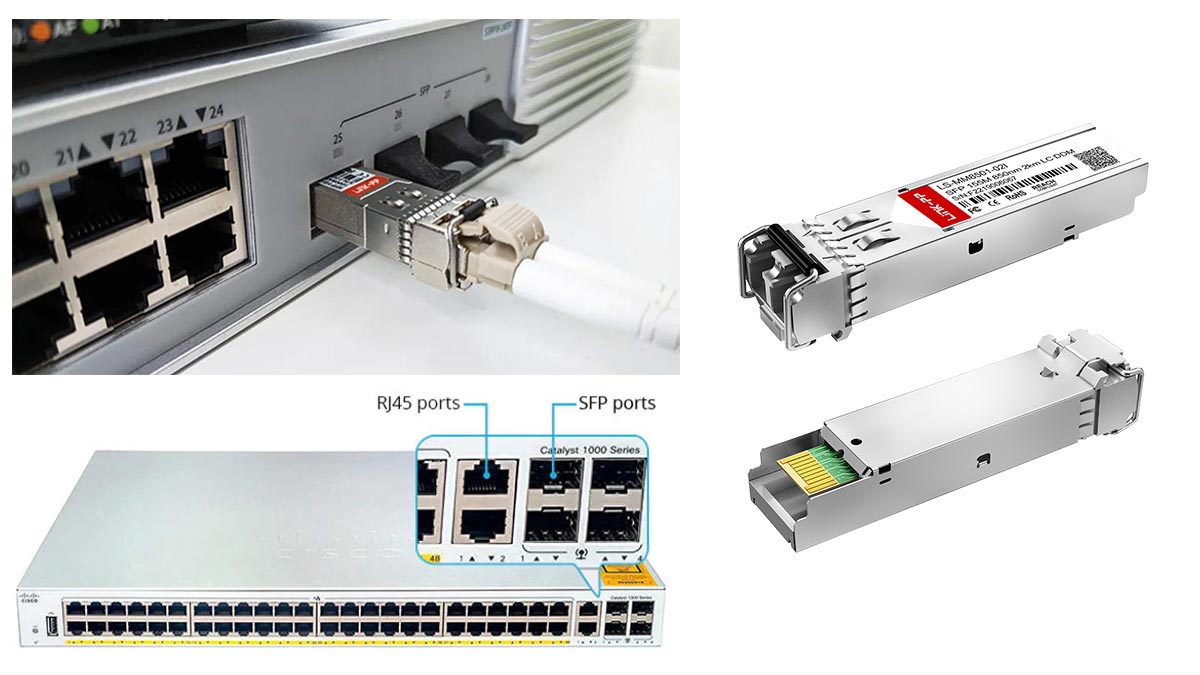
Modular Network Connectivity
One of the most important purposes of SFP ports is enabling modular network connectivity. Unlike fixed interfaces such as RJ45 Ethernet ports, SFP ports allow network administrators to insert different transceiver modules depending on the network design.
For example, the same switch may support multiple types of fiber modules, including:
short-range multimode SFP modules
long-distance single-mode transceivers
This modular approach provides significant operational advantages. If network requirements change—such as upgrading a link from copper to fiber—the administrator can simply replace the SFP module instead of replacing the entire switch or router.
As a result, SFP ports make network hardware more adaptable and future-proof, especially in rapidly evolving IT environments.
Flexible Media Support (Fiber or Copper)
Another key purpose of SFP ports is to support multiple transmission media. With the appropriate module installed, an SFP port can connect to either fiber-optic cables or copper Ethernet cables.
Fiber-based SFP modules are typically used for:
long-distance network connections
data center interconnects
high-bandwidth backbone links
Copper-based modules are commonly used for:
short-distance connections
integrating legacy Ethernet devices
connecting standard Cat5e or Cat6 infrastructure
This flexibility allows organizations to design networks that balance performance, cost, and distance requirements, while still using the same physical interface on the device.
High-Speed Network Expansion
SFP ports are also widely used to support high-speed network expansion. Many switches include dedicated SFP or enhanced versions such as SFP+ ports specifically for uplinks and backbone connectivity.
Compared with standard Ethernet ports, SFP-based connections often provide:
higher bandwidth for switch-to-switch links
longer transmission distances using fiber
reduced network congestion on aggregation layers
Because of these advantages, SFP ports are frequently used to connect:
access switches to distribution switches
servers to high-speed network fabrics
data center racks to aggregation layers
By enabling flexible module selection and high-performance connectivity, SFP ports play a critical role in building scalable and efficient network architectures.
☀️ Is an SFP Port the Same as Ethernet Port?
A common misunderstanding in networking is assuming that an SFP port is the same as an Ethernet port. In reality, they are not the same thing. Ethernet refers to a network communication protocol, while an SFP port is a physical hardware interface designed to support modular transceiver modules.
In other words, Ethernet defines how data is transmitted across a network, whereas an SFP port defines how the device physically connects to the network medium. Because of this distinction, SFP interfaces are often used to support Ethernet networks—but they are not Ethernet themselves.
Understanding this difference is important when selecting network equipment, configuring switches, or troubleshooting connectivity issues.
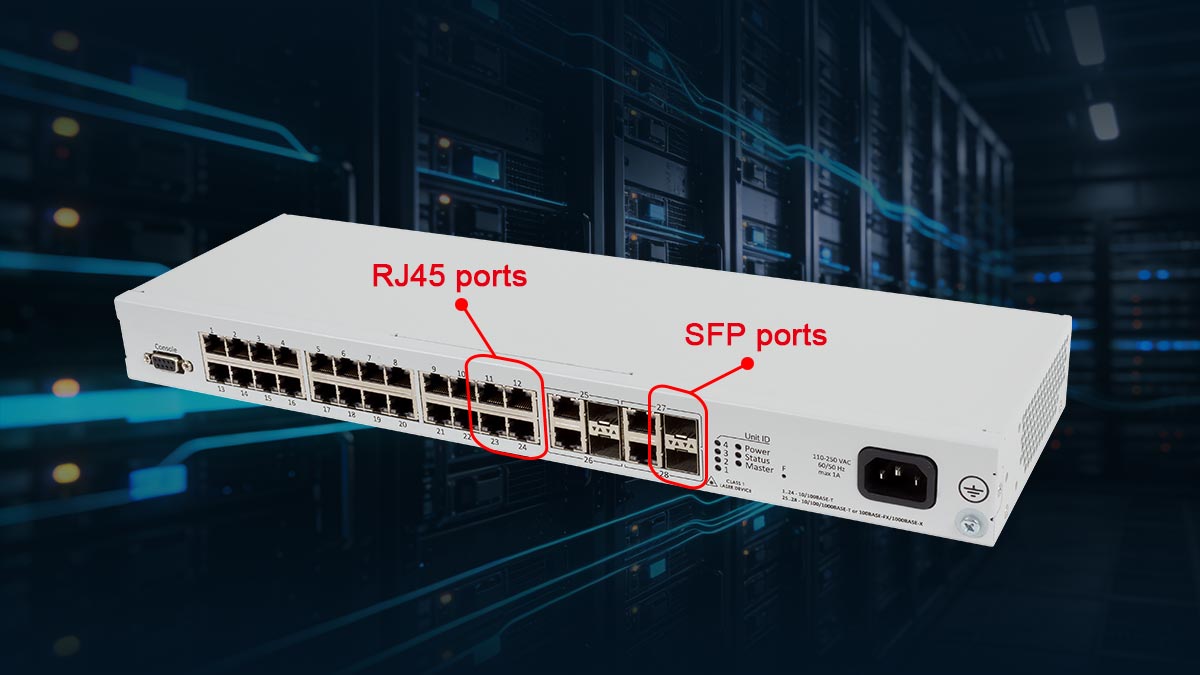
Understanding Ethernet vs. SFP
Ethernet is a networking technology standardized by IEEE 802.3, which defines how devices communicate over local area networks (LANs). The Ethernet standard specifies elements such as frame formats, transmission speeds, and signaling methods.
An SFP port, on the other hand, is a hardware interface slot designed to accept pluggable transceiver modules. These modules enable a device to connect to different types of network media, such as fiber-optic cables or copper Ethernet cables.
The key difference can be summarized as follows:
Ethernet → A networking protocol used to transmit data across networks
SFP → A modular physical interface used to connect networking hardware
Because SFP modules can support Ethernet signaling, many Ethernet networks use SFP interfaces for high-speed or long-distance connections.
Why Many Switches Include Both Ports
Many enterprise switches and routers include both RJ45 Ethernet ports and SFP ports because they serve different networking purposes.
RJ45 Ethernet ports are typically used for:
connecting computers and end-user devices
short-distance network connections within offices
standard copper cabling such as Cat5e or Cat6
SFP ports are usually used for:
switch-to-switch uplinks
long-distance fiber connections
high-bandwidth network aggregation
By including both port types, manufacturers allow network administrators to design more flexible network architectures. Devices can connect locally using copper Ethernet ports while using SFP ports for higher-speed backbone or inter-switch connections.
When to Use Ethernet or SFP
Choosing between Ethernet RJ45 ports and SFP interfaces depends on the network design, transmission distance, and performance requirements.
RJ45 Ethernet connections are generally preferred when:
connecting end-user devices
network distances are short (typically under 100 meters)
existing copper infrastructure is already installed
SFP connections are typically used when:
fiber-optic transmission is required
network links must cover longer distances
higher bandwidth or lower latency is needed for uplinks
In modern enterprise networks, both technologies are often used together. Ethernet ports provide convenient local connectivity, while SFP ports support the high-speed links that connect switches, servers, and data center infrastructure.
☀️ SFP vs. RJ45: Which Interface Should You Use?
When designing a network infrastructure, one of the most common questions is whether to use SFP interfaces or traditional RJ45 Ethernet ports. Both technologies are widely used in enterprise networking, but they serve different purposes depending on the network architecture, transmission distance, and scalability requirements.
RJ45 ports are typically associated with copper Ethernet connections and are commonly used for connecting end-user devices such as computers, printers, and access points. SFP interfaces, by contrast, are modular ports designed to support interchangeable transceiver modules, making them suitable for fiber-optic connections and high-speed uplinks.
Choosing between SFP and RJ45 depends on several technical and operational factors, including transmission distance, power consumption, scalability, and deployment cost.
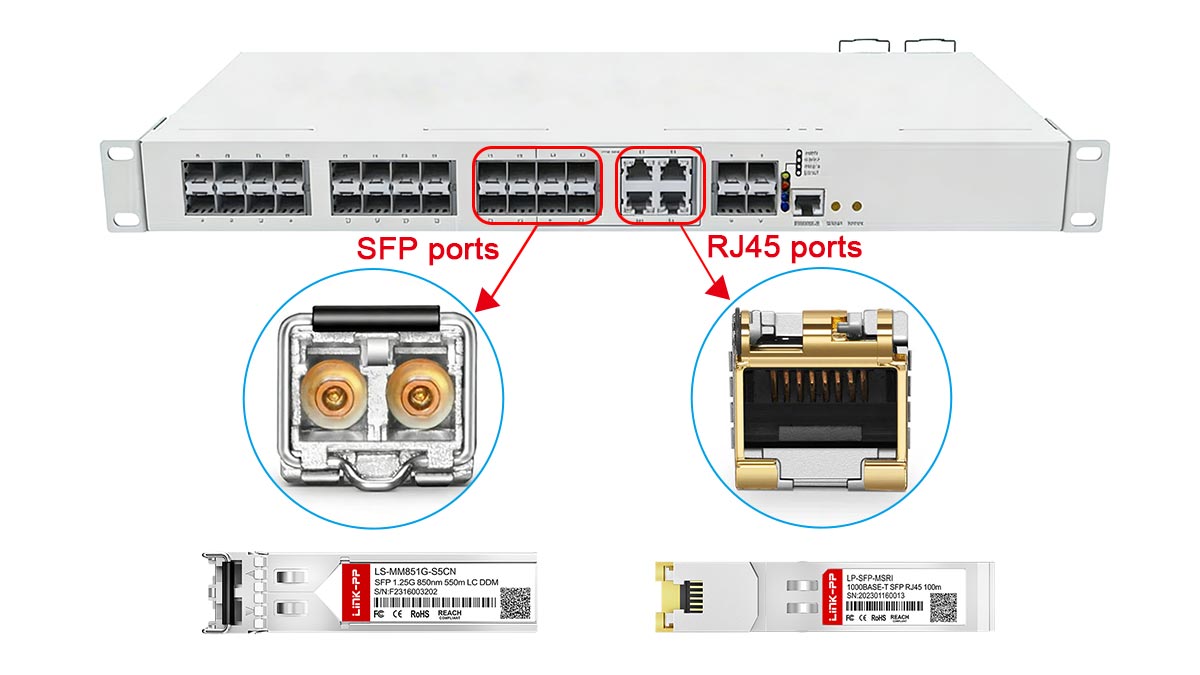
Transmission Distance Comparison
One of the most significant differences between SFP and RJ45 connections is the maximum transmission distance.
RJ45 Ethernet ports typically use copper cabling such as Cat5e or Cat6. According to the IEEE 802.3, standard copper Ethernet links support distances of up to 100 meters.
SFP interfaces, however, can support much longer distances depending on the type of module used:
Multimode fiber SFP modules: typically support distances of 300–550 meters
Single-mode fiber SFP modules: can support distances from several kilometers to more than 40 km
Because of this capability, SFP interfaces are often used for building-to-building connections, campus networks, and long-distance backbone links.
Power Consumption and Heat
Power efficiency is another important factor when comparing SFP and RJ45 interfaces.
Copper Ethernet connections often consume more power because electrical signals must travel through copper cables. This can generate additional heat in high-density switch deployments.
Fiber-based SFP modules generally consume less power and produce less heat, particularly when used for long-distance connections. In large data centers where hundreds of high-speed ports are deployed, the difference in power consumption can become significant.
For this reason, many modern data center networks prefer fiber-based SFP or enhanced versions such as SFP+ interfaces for high-bandwidth connections.
Network Scalability
Another advantage of SFP interfaces is their modular scalability. Because SFP ports accept interchangeable transceiver modules, administrators can upgrade or modify network connections without replacing the entire switch or router.
For example, a network device with SFP ports can support:
short-range multimode fiber modules
long-range single-mode fiber modules
copper RJ45 SFP modules
This flexibility allows organizations to adapt to changing network requirements, such as increasing bandwidth or expanding network distance. By simply replacing the module, the same hardware can support new connectivity options.
RJ45 ports, in contrast, are fixed interfaces and cannot easily adapt to different transmission media or long-distance requirements.
Deployment Cost
Cost is often one of the most important considerations when choosing between SFP and RJ45 connections.
RJ45 Ethernet infrastructure is typically more cost-effective for short-distance connections, especially when copper cabling is already installed. Copper Ethernet cables and ports are widely available and require minimal specialized equipment.
SFP-based connections may involve higher initial costs due to the need for:
fiber-optic cables
SFP transceiver modules
compatible networking hardware
However, SFP interfaces can provide long-term cost advantages in larger networks because they support higher bandwidth, longer distances, and easier scalability. For enterprise networks, campus environments, and data centers, these benefits often outweigh the initial investment.
SFP Interface vs. RJ45 Interface
Feature | SFP Interface | RJ45 Interface |
|---|---|---|
Interface Type | Modular transceiver slot | Fixed Ethernet port |
Connection Media | Fiber optic or copper (via SFP module) | Copper Ethernet cable |
Typical Cable Types | Single-mode fiber, multimode fiber, or RJ45 SFP module | Cat5e, Cat6, Cat6a Ethernet cables |
Maximum Distance | Up to tens of kilometers depending on module | Up to 100 meters |
Network Flexibility | High – interchangeable modules support different media and distances | Limited – fixed copper interface |
Scalability | Easy to upgrade by replacing SFP modules | Requires hardware upgrade |
Typical Use Cases | Switch uplinks, data center links, backbone connections | End devices, office networking |
Power Consumption | Generally lower for fiber modules | Higher in high-speed copper ports |
Deployment Cost | Higher initial cost (modules and fiber cables) | Lower cost for short-distance deployments |
Key takeaway
RJ45 interfaces are ideal for short-distance connections and standard Ethernet devices.
SFP interfaces are better suited for high-speed uplinks, long-distance fiber links, and scalable network infrastructure.
In most modern enterprise networks, both interfaces are used together: RJ45 ports handle local device connectivity, while SFP interfaces provide high-performance backbone connections between switches and network layers.
Ultimately, the choice between SFP and RJ45 depends on the specific network requirements. Many modern network designs combine both technologies—using RJ45 ports for local device connections and SFP interfaces for high-speed uplinks and backbone connectivity.
☀️ Common Applications of SFP Interfaces
SFP interfaces are widely used in modern networking environments due to their modular design, high-speed capabilities, and flexible media support. Their versatility makes them suitable for enterprise networks, data centers, and telecommunications infrastructure, allowing organizations to build scalable and reliable networks. By inserting different types of SFP modules, network engineers can adapt devices to specific use cases without replacing the hardware.
Switch Uplink Connections
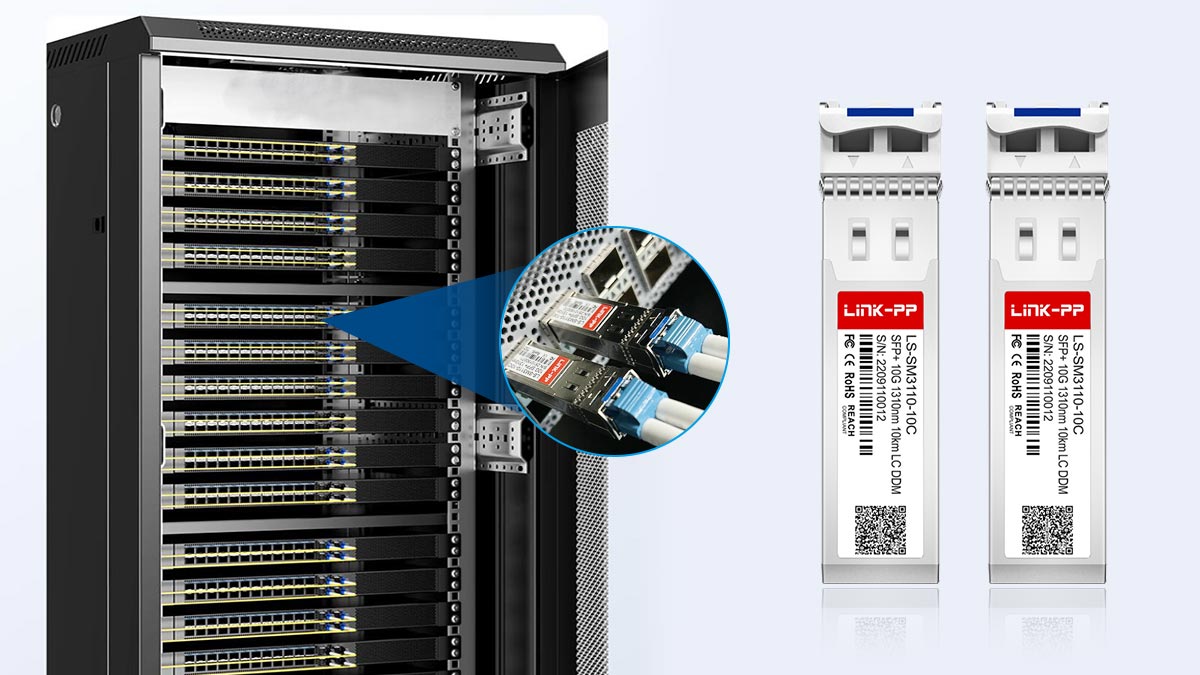
One of the most common applications of SFP interfaces is switch uplink connections. In enterprise networks, SFP ports are often used to connect access switches to distribution or core switches, providing a high-speed backbone link. Using SFP modules, these uplinks can support fiber or copper connections, giving administrators the flexibility to choose the optimal media for bandwidth, distance, and network layout.
Data Center Fiber Networks
In data center environments, SFP interfaces are critical for connecting servers, storage systems, and network switches. Fiber-based SFP modules are commonly used to reduce latency and increase bandwidth, supporting 1G, 10G, and even higher-speed connections. By leveraging SFP ports, data center networks can maintain high availability and simplify cable management with modular, standardized transceivers.
Long-Distance Fiber Links
For telecom and campus networks, SFP interfaces enable long-distance fiber connectivity. Single-mode fiber SFP modules can transmit data over several kilometers, making them ideal for connecting buildings, remote offices, or central offices in telecom infrastructure. This capability allows network operators to maintain consistent performance across wide geographical areas.
High-Speed Network Infrastructure
SFP interfaces are also used in high-speed network infrastructure, such as aggregation and backbone layers. High-performance SFP+ modules support 10G, 25G, or even 40G connections, providing the speed and reliability required for bandwidth-intensive applications like cloud computing, virtualization, and large-scale data transfers. By combining multiple SFP ports, organizations can build scalable and future-proof network topologies that adapt to evolving traffic demands.
💡 Summary
The modularity, media flexibility, and high-speed capabilities of SFP interfaces make them essential components in enterprise networks, data centers, and telecom infrastructure. They enable network designers to build scalable, reliable, and high-performance networks without the need for constant hardware replacements.
☀️ Common SFP Interface Issues and Troubleshooting
While SFP interfaces offer flexibility and high performance, network engineers often encounter common issues related to module compatibility, link stability, and fiber type mismatches. Understanding these issues is essential for maintaining reliable network connections and ensuring optimal performance.
SFP Compatibility Problems
One of the most frequent issues reported in forums and real-world networks is SFP module compatibility. Not all SFP modules work with every switch or router due to vendor restrictions or firmware limitations. Some devices enforce vendor lock, accepting only manufacturer-certified modules.
Tips to avoid compatibility issues:
Check device specifications for supported SFP module models.
Verify module speed (1G, 10G, or SFP+) matches the port type.
Consider using third-party modules certified for the specific hardware.
Compatibility problems often manifest as link failure or module not recognized, even though the physical connection appears correct.
Speed Mismatch (SFP vs. SFP+)
Another common issue occurs when speed settings between SFP ports and modules do not match. For example:
Inserting an SFP+ 10G module into a 1G SFP port
Mixing 1G SFP and 10G SFP+ ports in the same link without proper negotiation
These mismatches can cause:
Link down or intermittent connectivity
Network errors or slow performance
Best practices:
Confirm port and module speed compatibility before deployment
Ensure auto-negotiation settings are properly configured
Use network monitoring tools to detect speed mismatches early
Fiber Type Mismatch (SMF vs. MMF)
Fiber-based SFP modules must match the fiber type in use:
Single-mode fiber (SMF) modules are designed for long-distance links
Multimode fiber (MMF) modules are designed for short to medium distances
Using the wrong fiber type can result in link failures or poor signal quality. Symptoms include:
Link not coming up
High error rates
Unexpected network performance degradation
Solution:
Verify module specifications against existing fiber infrastructure
Avoid mixing SMF and MMF in the same link
Diagnosing SFP Port Errors
To troubleshoot SFP interface problems effectively, network engineers should:
Check the module and port status using switch diagnostics
Verify cable type and length against module specifications
Inspect for physical damage on the SFP module or port
Test with a known working module to isolate hardware issues
Monitor network logs for repeated link failures or errors
By following these steps, most common SFP interface issues—such as compatibility problems, speed mismatches, or fiber type errors—can be quickly identified and resolved, ensuring stable network performance.
☀️ Conclusion: How to Choose the Right SFP Interface Module
Selecting the right SFP interface module is essential for ensuring reliable, high-performance network connectivity. When purchasing SFP modules, network administrators and IT buyers must consider factors such as transmission type, distance requirements, and vendor compatibility. Making informed decisions can prevent network downtime, reduce troubleshooting, and improve long-term scalability.
Optical SFP vs. Copper SFP
When choosing between optical (fiber) SFP modules and copper (RJ45) SFP modules, consider the following:
Optical SFP modules: Ideal for long-distance links, high-speed uplinks, and fiber backbone connections. They support both single-mode and multimode fibers, enabling transmission over hundreds of meters to tens of kilometers.
Copper SFP modules: Suitable for short-distance connections (typically under 100 meters) using existing Cat5e/Cat6 copper cabling. They offer easier deployment and lower cost for local device connections.
The choice depends on the network’s distance, speed, and infrastructure requirements.
Transmission Distance Considerations
Different SFP modules are designed for varying distances:
Multimode fiber (MMF) modules: 300–550 meters, used for short- to medium-range connections within buildings or data centers.
Single-mode fiber (SMF) modules: several kilometers to 40+ km, used for inter-building or campus-wide connections.
Copper SFP modules: up to 100 meters, suitable for office or rack-level connectivity.
Always match the module type to the required link distance to avoid signal degradation or failed connections.
Vendor Compatibility
Vendor compatibility is another critical factor. Some networking devices only support OEM-certified SFP modules, and using incompatible modules may result in:
Module not recognized by the device
Link failures or intermittent connectivity
Voided hardware warranty in some cases
Best practices:
Check the device datasheet for supported SFP modules
Use vendor-certified modules whenever possible
Consider reputable third-party modules that explicitly list compatibility
By carefully considering module type, transmission distance, and vendor compatibility, you can select the SFP interface module that best meets your network requirements while ensuring long-term performance and scalability.
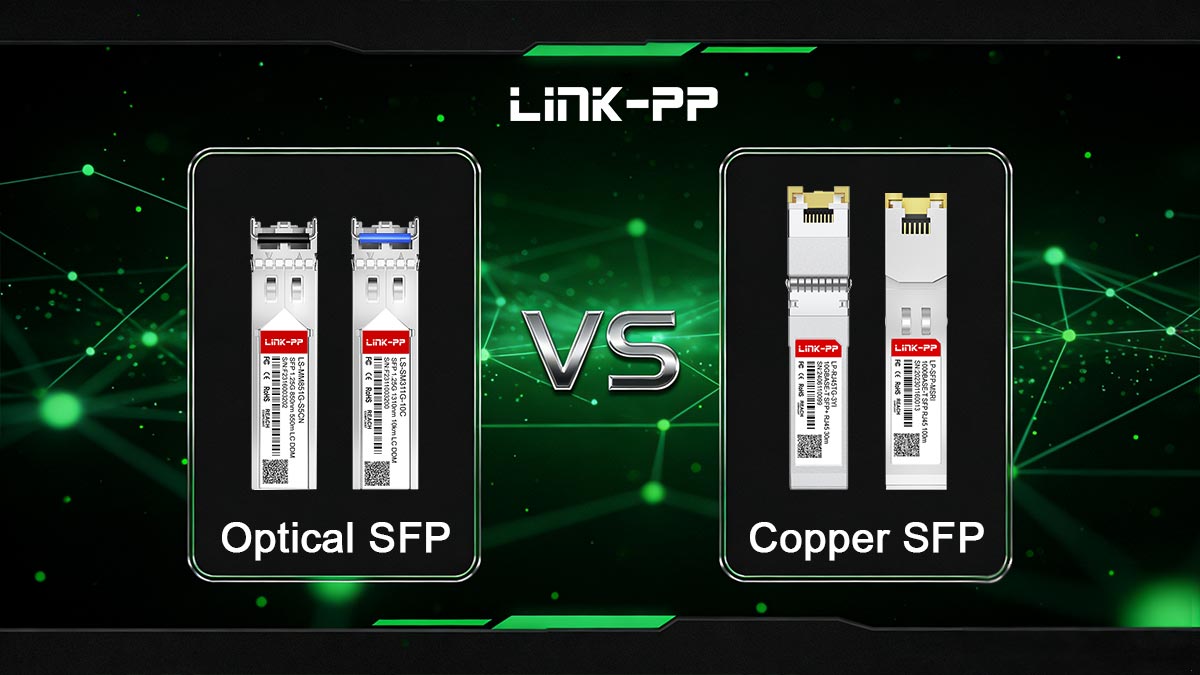
For high-quality, reliable, and vendor-compatible SFP modules, visit the LINK-PP Official Store. Here you can browse a wide range of optical and copper SFP solutions that are fully compatible with enterprise switches, data centers, and telecom networks, ensuring long-term performance and network stability.
vendor-compatible SFP modules
Choose the Right SFP Interface Module



