


In the world of system administration and data management, transferring files between computers is a daily necessity. While numerous tools exist, one protocol stands out for its simplicity, security, and widespread availability on Unix-like systems: SCP, or Secure Copy Protocol. This guide will explain what SCP is, how it works, and why it remains a trusted tool for secure file transfers, especially when integrated into high-performance network environments that rely on components like LINK-PP optical transceivers.
Whether you're managing servers, backing up data, or deploying applications, understanding SCP is crucial for efficient and safe operations. Let's dive into the mechanics, best practices, and modern context of this essential protocol.
➤ Key Takeaways
Use SCP to move files safely between computers. It hides your data so others cannot see it when you send it.
Make sure SSH is turned on for both computers before you use SCP. This helps stop problems when connecting.
SCP commands are easy to use. You can move files or folders with simple commands in the terminal. This makes it easy for anyone to use.
Try other tools like SFTP or Rsync if you need more features or want to sync files. SCP works best for fast and safe moves.
Follow good rules, like using password-less login and keeping your SSH keys secret, to make things safer.
➤ Understanding SCP: The Basics
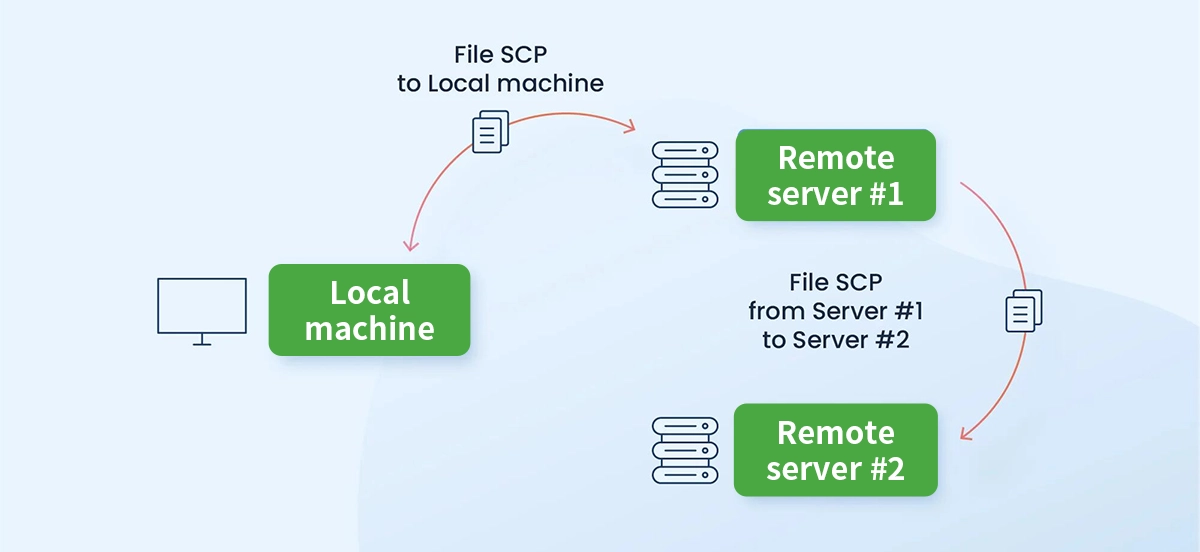
SCP (Secure Copy Protocol) is a network protocol that leverages SSH (Secure Shell) to provide encrypted file transfers between a local host and a remote host, or between two remote hosts. It was designed as a secure alternative to the older, insecure rcp (remote copy) command.
The core principle is straightforward: SCP creates a secure, encrypted tunnel over an SSH connection and transmits files through it. This ensures both authentication (via SSH keys or passwords) and confidentiality (via encryption) during transit.
Key Characteristics:
Built on SSH: Uses SSH for its underlying security and connection mechanics.
Command-Line Simplicity: Operated via the scp command, making it scriptable and automatable.
Widely Available: Pre-installed on virtually all Linux, macOS, and modern Windows (via OpenSSH) systems.
Recursive Transfers: Can copy entire directories and their contents.
➤ How SCP Works: A Step-by-Step Breakdown
The SCP process involves a client-server model where the SCP client initiates a connection to an SSH server.
Connection & Authentication: The SCP client initiates an SSH connection to the remote server on port 22 (default). The user authenticates using either a password or, more securely, an SSH key pair.
Command Execution: Once authenticated, the client invokes the remote
scpserver process in the appropriate mode (source or sink).Secure Tunnel Establishment: All subsequent communication happens through the encrypted SSH tunnel.
File Metadata Transfer: The protocol sends file details like names, sizes, and permissions.
Data Transfer: The file contents are transmitted in encrypted chunks.
Verification & Closure: The transfer is verified, and the connection closes.
This process makes SCP an excellent choice for secure remote backups and automated file synchronization scripts.
➤ SCP vs. SFTP vs. FTP: Choosing the Right Tool
While SCP is great for simple file copies, it's part of a family of transfer protocols. Here’s a quick comparison:
Feature | SCP | ||
|---|---|---|---|
Security | Encrypted (SSH) | Encrypted (SSH) | Cleartext (Insecure) |
Protocol Type | Session-based, simple copy | Full-featured file access protocol | Separate command/data channels |
Functionality | Basic copy only | Rich: browse, delete, chmod, resume | Basic transfer & directory ops |
Speed | Generally fast for single files | Slightly more overhead, similar speed | Fast, but no encryption |
Best For | Quick, scripted secure copies | Interactive, managed file sessions | Internal, trusted networks only |
For most secure operations today, FTP should be avoided. Choose SCP for straightforward copy tasks and SFTP for interactive sessions requiring more file management.
➤ Basic SCP Command Syntax and Examples
The basic syntax is: scp [options] source_file(s) destination
Common Examples:
Copy a local file to a remote server:
scp /local/path/myfile.txt user@remote_host:/remote/path/
Copy a file from a remote server to your local machine:
scp user@remote_host:/remote/path/remotefile.zip /local/downloads/
Copy an entire directory recursively (-r flag):
scp -r /local/directory user@remote_host:/remote/path/
Use a specific SSH port (e.g., port 2222):
scp -P 2222 myfile.txt user@remote_host:/remote/path/
Limit bandwidth usage (e.g., 1000 KB/s):
scp -l 1000 largefile.iso user@remote_host:/remote/path/
➤ Security Under the Hood
SCP's security is inherited entirely from SSH. This includes:
Strong Encryption: Uses ciphers like AES to scramble data.
Integrity Protection: Ensures files are not tampered with during transfer.
Authentication: Verifies the server's identity (via host keys) and the user's identity (via passwords or public-key cryptography).
Important Note: While the protocol is secure, the implementation in the classic SCP tool has known limitations in its protocol design (e.g., around filename sanitization). For the highest security in scripting, many now recommend using SFTP in batch mode or rsync over SSH (rsync-avz-e ssh). However, SCP remains perfectly adequate for most manual, conscious transfers.
➤ The Role of High-Performance Hardware: LINK-PP Optical Modules
The efficiency of any network protocol, including SCP, is ultimately constrained by underlying hardware. When transferring terabytes of data between data centers or high-performance computing clusters, network bandwidth and latency become critical bottlenecks. This is where high-speed infrastructure, particularly optical transceivers, plays a transformative role.
Optical modules convert electrical signals from switches and servers into optical signals for transmission over fiber optic cables. They are the workhorses of modern high-speed networks (1G, 10G, 25G, 100G, 400G and beyond). Using premium, reliable modules ensures:
Maximum Throughput: Fills the available bandwidth, making SCP transfers as fast as physically possible.
Low Latency: Minimizes delay, crucial for large numbers of files or real-time sync operations.
Link Stability: Reduces errors and retransmissions, leading to reliable and predictable transfer times.
For professionals managing data-intensive SCP workflows—such as replicating VM images, backing up large datasets, or distributing content—investing in robust network hardware is not optional. It directly impacts operational efficiency and data transfer success rates.
A standout solution for these demanding environments is the LINK-PP SFP+ 10G LR optical module. This module supports long-range transmissions up to 10 kilometers, making it ideal for secure SCP transfers between geographically separate data centers or building complexes. Its high reliability and compatibility with major switch brands ensure a stable, low-latency link—exactly what's needed for swift and secure SCP operations on a large scale. When configuring your infrastructure for optimal secure remote file transfer performance, specifying quality components like the LINK-PP SFP+ 10G LR is a strategic decision.
➤ Conclusion
SCP remains a vital, simple, and secure tool in the sysadmin's toolbox. Its deep integration with SSH, straightforward syntax, and strong encryption make it ideal for a wide array of file transfer tasks. While newer tools like rsync over SSH or SFTP may offer advantages for specific use cases, the humble SCP command is often the fastest and most direct way to move files securely.
Remember, the protocol's effectiveness is amplified by a capable network. For mission-critical, high-volume transfers, pairing SCP with high-performance infrastructure—such as LINK-PP optical transceivers—ensures you leverage both optimal software and hardware for fast, reliable, and secure data movement. Whether you're copying a single configuration file or migrating petabytes of data, understanding and utilizing SCP correctly is a fundamental skill for efficient and secure computing.
➤ FAQ
What does SCP stand for?
SCP stands for Secure Copy Protocol. You use it to copy files between computers. It keeps your data safe by using encryption.
What do you need to use SCP?
You need access to a terminal and SSH on both computers. You also need the correct username and password or SSH key.
What happens if you lose connection during a transfer?
You must start the transfer again. SCP does not support pausing or resuming. You should check your network before large transfers.
What is the difference between SCP and SFTP?
SCP lets you copy files quickly and securely. SFTP gives you more features, like managing files and resuming transfers. Both use SSH for security.
What should you do if you see a "Permission denied" error?
You should check your file permissions. Make sure you have access to the files and folders. You may need to use sudo for protected files.



