


In modern fiber optic networks, even microscopic contamination can have a measurable impact on performance. Dust particles, oil residue, and fingerprint traces on the optical interface of an SFP transceiver can increase insertion loss, raise the bit error rate (BER), and ultimately lead to unstable links or unexpected network downtime. In high-density data center and telecom environments, these issues are often misdiagnosed as hardware failures—when in reality, they are caused by something far simpler: a dirty optical interface.
This is why proper cleaning is not just a maintenance task—it is a critical first step in troubleshooting and performance optimization. Industry best practices, including guidelines from organizations such as IEC and TIA, emphasize the importance of maintaining clean fiber end-faces to ensure reliable signal transmission.
However, cleaning an SFP module is not as straightforward as it may seem. Using the wrong tools, applying excessive force, or skipping inspection can actually worsen contamination or even damage the delicate optical components inside the transceiver. Many real-world failures are the result of improper cleaning methods rather than a lack of cleaning.
In this guide, you will learn:
How to clean an SFP transceiver safely and effectively
Which tools and materials are recommended for different scenarios
The correct step-by-step cleaning procedure used by professionals
Common mistakes that can damage optical modules
Preventive practices to reduce contamination and extend module lifespan
By following the methods outlined in this article, you can significantly improve network stability, reduce unnecessary module replacements, and ensure consistent optical performance across your infrastructure.
💡 Why Cleaning an SFP Transceiver Is Critical for Network Performance
In fiber optic communication systems, the optical interface of an SFP transceiver operates at extremely high precision. The fiber end-face and internal optical components must remain clean to ensure accurate light transmission. Even micron-level contamination—invisible to the naked eye—can significantly degrade network performance. This makes proper cleaning not optional, but essential for maintaining reliable and stable links.
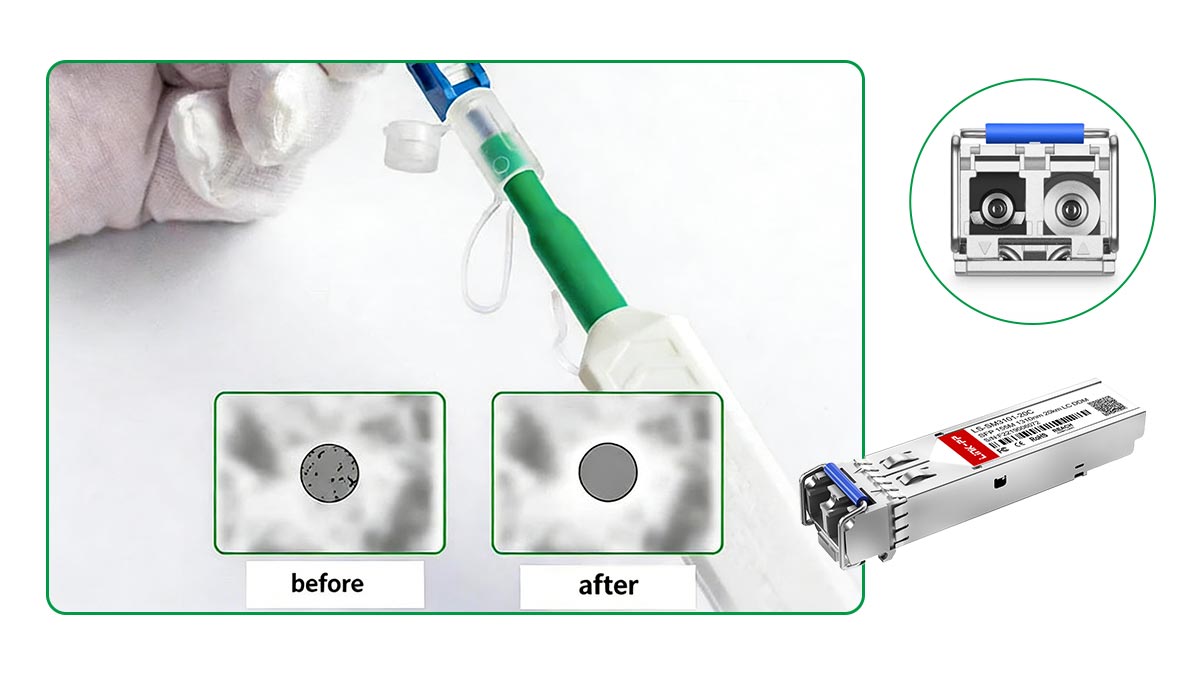
Impact of Contamination: Dust, Oil, and Residue
The most common contaminants found on SFP optical interfaces include:
Dust particles: Airborne debris that settles on the fiber end-face
Oil and fingerprints: Introduced through direct contact during handling
Residue from improper cleaning: Left behind by low-quality wipes or excessive solvent use
Because fiber optic cores are extremely small (typically 8–10 µm for single-mode fiber), even tiny particles can partially or fully block the optical signal path. Unlike electrical interfaces, optical transmission is highly sensitive to surface cleanliness—any obstruction directly interferes with light propagation.
Effects on BER, Insertion Loss, and Link Stability
Contamination at the optical interface can lead to several measurable performance issues:
Increased insertion loss: Dirt or residue reduces the amount of light transmitted across the connection
Higher bit error rate (BER): Signal distortion causes data transmission errors
Back reflection (return loss issues): Irregular surfaces scatter light back toward the source
Intermittent link instability: Connections may fluctuate between normal and degraded states
In practical scenarios, these issues often manifest as:
CRC errors
Packet loss
Link flapping or unexpected disconnects
Importantly, these symptoms are frequently misinterpreted as hardware failure, leading to unnecessary replacement of otherwise functional SFP modules.
High-Power Optics and Contamination Risks
In standard optical systems, contamination primarily causes signal degradation. However, in higher optical power environments—such as long-reach single-mode links or DWDM systems—the risks become more severe.
When debris is present on the fiber end-face:
It can absorb optical energy
This may lead to localized heating at the contamination point
Over time, this can result in permanent damage to the fiber end-face or connector interface
While such damage is not common in typical enterprise networks, it is a well-documented risk in high-power optical applications. This reinforces the importance of maintaining clean optical interfaces, especially in critical infrastructure.
👉 In fiber networks, cleanliness directly equals performance.
Routine inspection and proper cleaning of SFP transceivers can:
Reduce insertion loss
Improve signal integrity
Prevent avoidable network failures
In many cases, cleaning is the first and most effective troubleshooting step—long before considering module replacement or system reconfiguration.
💡 Tools and Materials Required for SFP Cleaning
Using the correct tools is just as important as following the correct cleaning procedure. Optical interfaces are highly sensitive, and improper tools can introduce new contamination or even cause permanent damage. Industry best practices—referenced in standards such as IEC 61300-3-35—emphasize controlled, repeatable cleaning using purpose-built tools.
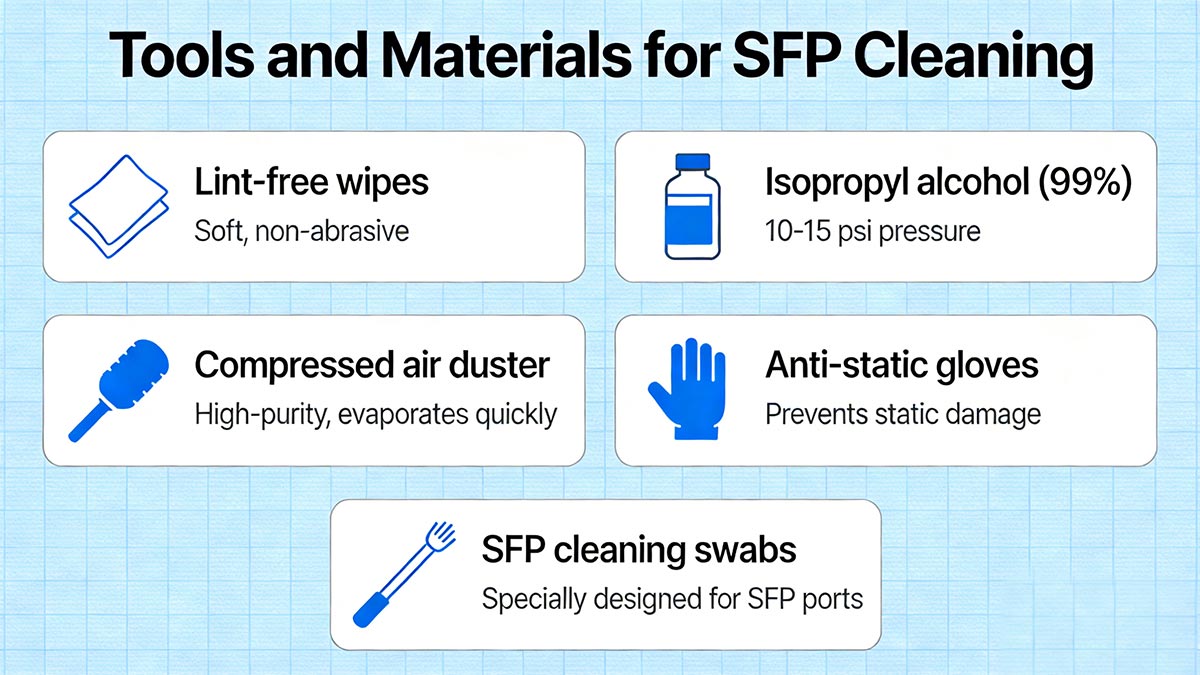
Below is a breakdown of the essential tools and how to select them based on your specific cleaning scenario.
One-Click Cleaners vs. Swabs vs. Cassettes
Different cleaning tools are designed for different parts of the optical interface:
1. One-Click Cleaners (Push-Type Cleaners)
Designed for:
SFP optical ports
Features:
Simple “push-to-clean” mechanism
Consistent cleaning pressure
Minimal user error
✅ Best for:
Fast, repeatable cleaning in field environments
Routine maintenance before connection
2. Lint-Free Cleaning Swabs
Designed for:
Internal optical ports (inside SFP modules)
Features:
Small, precision tips (e.g., 1.25mm for LC)
Can be used with cleaning solvent
✅ Best for:
Stubborn contamination
Internal sleeve/ferrule cleaning
3. Cleaning Cassettes (Reel-Type Cleaners)
Designed for:
Exposed fiber connectors (patch cords)
Features:
Flat lint-free cleaning surface
Supports controlled linear wiping
✅ Best for:
Cleaning male fiber connectors before insertion
IPA (≥99%) and Lint-Free Wipes
When dry cleaning is insufficient, wet cleaning may be required.
Isopropyl Alcohol (IPA ≥99%)
Effectively removes:
Oil
Grease
Stubborn residue
⚠️ Best Practices:
Use sparingly (lightly dampened, not soaked)
Avoid direct application into the optical port
Always follow with a dry wipe
Lint-Free Fiber Cleaning Wipes
Prevent fiber shedding and secondary contamination
Designed specifically for optical surfaces
✅ Best for:
External connector end-face cleaning
Wet + dry cleaning combination
Fiber Inspection Microscope (Inspection-First Approach)
A fiber inspection microscope is not optional in professional environments—it is a critical diagnostic tool.
Used to:
Detect contamination (dust, oil, scratches)
Verify cleaning effectiveness
Supports the industry-standard workflow:
Inspect → Clean → Inspect again
According to IEC guidelines, connectors should be inspected before and after cleaning to ensure they meet cleanliness standards.
Tool Selection Based on Use Case
Choosing the right tool depends on where and what you are cleaning:
Cleaning Scenario | Recommended Tool |
|---|---|
SFP optical port (internal) | Lint-free swab or one-click cleaner |
Fiber patch cord (connector end-face) | Cleaning cassette or lint-free wipe |
Light dust contamination | One-click cleaner (dry cleaning) |
Oil or stubborn residue | IPA + lint-free wipe or swab |
Inspection and validation | Fiber microscope |
👉 There is no single “universal tool” for SFP cleaning—correct tool selection is essential for effective and safe cleaning.
By combining:
Proper inspection tools
High-quality cleaning consumables
Application-specific devices
you can ensure consistent cleaning results while minimizing the risk of damage to sensitive optical components.
💡 Step-by-Step Guide on How to Clean an SFP Transceiver
Cleaning an SFP transceiver should follow a structured, repeatable process to ensure effectiveness while minimizing the risk of damage. Industry best practice—aligned with standards such as IEC 61300-3-35—follows a simple but critical workflow:
Inspect → Clean → Inspect again
Below is a professional, field-proven step-by-step procedure.
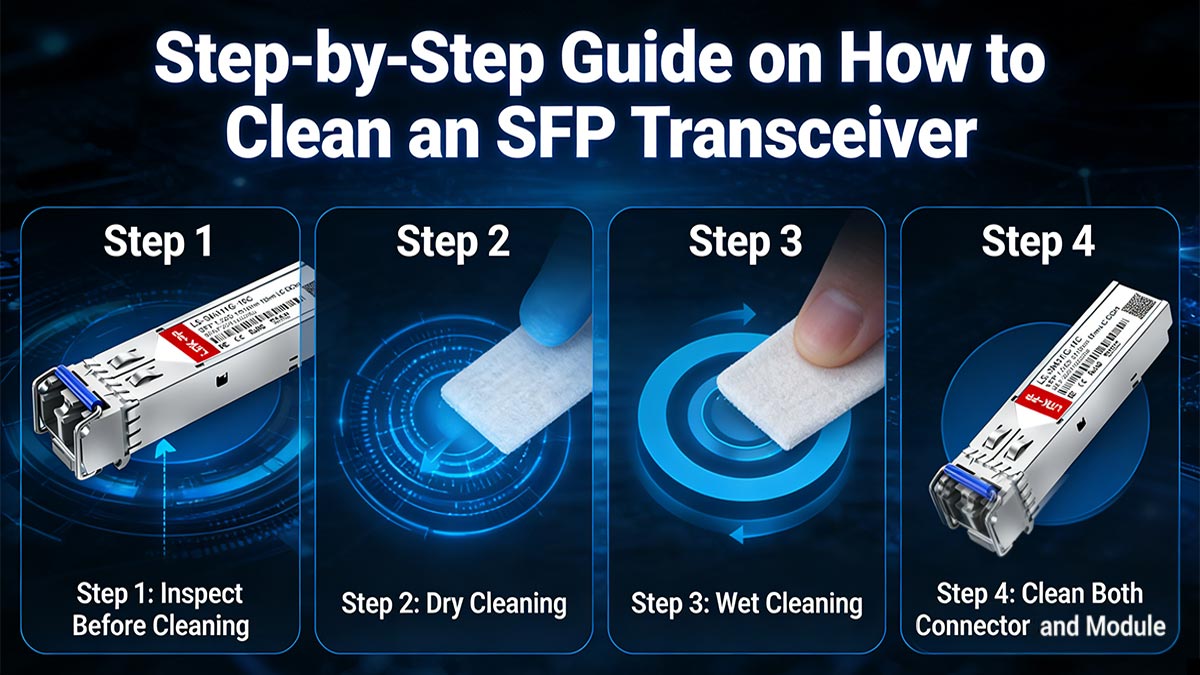
Step 1: Inspect Before Cleaning (Critical First Step)
Before performing any cleaning, always inspect the optical interface using a fiber inspection microscope.
What to check:
Dust particles
Oil or smudges
Scratches or permanent defects
Why this matters:
Avoids unnecessary cleaning (which can introduce wear)
Helps determine the correct cleaning method (dry vs. wet)
Identifies irreversible damage (cleaning won’t fix scratches)
If no contamination is present, cleaning is not required.
Step 2: Dry Cleaning (First Pass)
Start with dry cleaning, as most contamination (dust and loose particles) can be removed without solvents.
Recommended tools:
One-click cleaner
Cleaning cassette (for connectors)
Procedure:
Insert the cleaner into the SFP optical port or apply to the connector
Activate the cleaning mechanism (push/click)
For wipes/cassettes: clean in a single, consistent direction
Key points:
Do not apply excessive force
Avoid repeated unnecessary passes
Dry cleaning is often sufficient and should always be attempted first.
Step 3: Wet Cleaning (If Needed)
If contamination persists (e.g., oil or residue), proceed with wet cleaning.
Materials:
≥99% isopropyl alcohol (IPA)
Lint-free wipe or precision swab
Procedure:
Lightly dampen the wipe or swab (do NOT soak)
Wipe the end-face in a single direction
Immediately follow with a dry section of the wipe to remove residue
For internal SFP ports:
Use a lint-free swab with a gentle rotational motion
Important precautions:
Never drip liquid directly into the optical port
Avoid over-wetting, which can leave residue or migrate the module
Step 4: Clean Both Connector and Module
A common mistake is cleaning only one side of the connection.
Always clean both:
The SFP transceiver optical port
The mating fiber connector (patch cord)
Why this is critical:
A contaminated connector can immediately re-contaminate a clean module
Ensures full signal path integrity
Step 5: Re-Inspect and Verify
After cleaning, perform a final inspection using a fiber microscope.
Confirm that:
No dust particles remain
No streaks or residue are visible
No new scratches have been introduced
If contamination persists:
Repeat the cleaning process with a new wipe/swab
Only reconnect the fiber once the end-face is confirmed clean.
👉 Effective SFP cleaning is not about force—it’s about process and precision.
By following:
Inspection-first methodology
Proper dry and wet cleaning techniques
Final verification
you can significantly reduce signal loss, prevent recurring issues, and ensure stable, high-performance optical links.
💡 Common Mistakes to Avoid When Cleaning SFP Modules
Even when users attempt to clean SFP transceivers, improper techniques can introduce new contamination or permanently damage the optical interface. In many real-world cases, network issues persist not because cleaning was skipped—but because it was done incorrectly.
Avoiding the following common mistakes is essential to ensure safe and effective cleaning.
Using Tissues or Cotton Swabs
Household materials such as tissues, paper towels, or standard cotton swabs are not suitable for optical cleaning.
Why they are problematic:
Contain coarse fibers that can scratch the fiber end-face
Shed lint, causing secondary contamination
Lack the precision required for small optical interfaces
Always use lint-free, fiber-optic-grade wipes and swabs specifically designed for connector cleaning.
Touching Optical Surfaces
Direct contact with the optical interface is one of the most common and damaging mistakes.
Risks include:
Transfer of skin oils and moisture
Stubborn contamination that is difficult to remove
Increased insertion loss and signal degradation
Never touch the fiber end-face, optical port, or ferrule—even briefly.
Overusing Alcohol (IPA)
While ≥99% isopropyl alcohol (IPA) is effective for removing oil and residue, excessive use can cause problems.
Common issues:
Residue left behind due to over-wetting
Liquid entering the optical port or module interior
Attraction of new dust particles during slow evaporation
Best practice:
Use IPA sparingly (lightly damp, not soaked)
Always follow with a dry wipe to remove residue
Skipping Inspection
Cleaning without inspection is inefficient and can even be harmful.
Why this is a mistake:
You may clean a connector that is already clean, causing unnecessary wear
You cannot verify whether cleaning was successful
Physical damage (scratches) may go unnoticed
According to guidelines from IEC, inspection is a critical part of the cleaning process.
Always follow:
Inspect → Clean → Inspect again
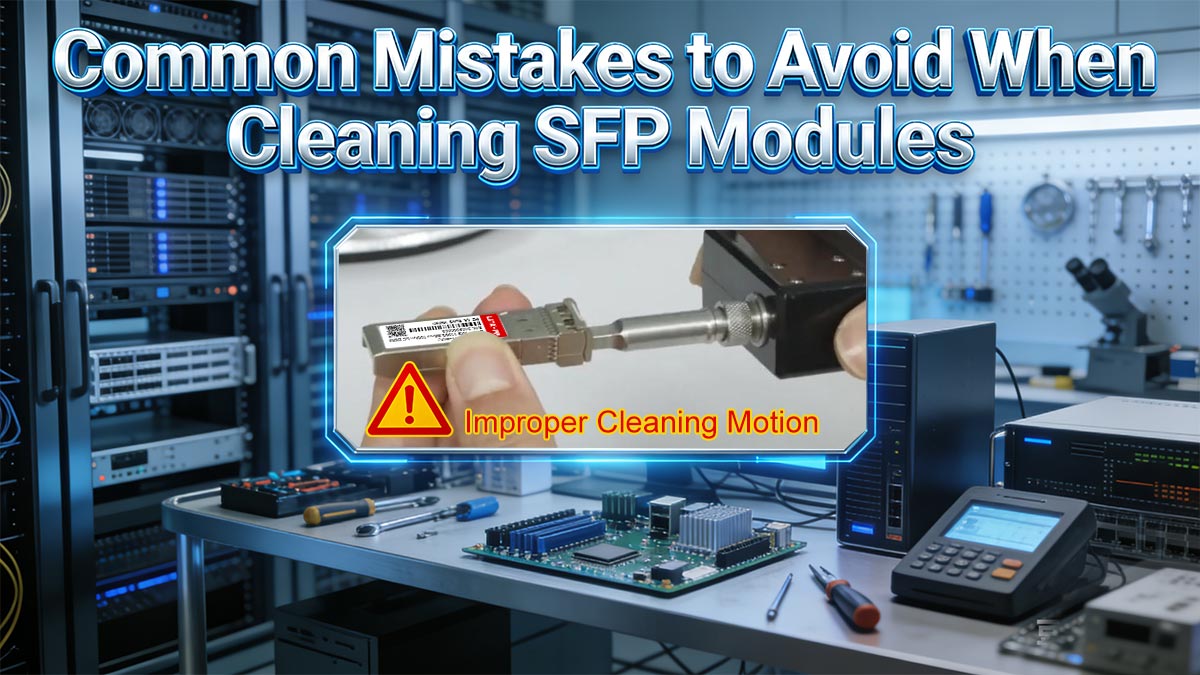
Improper Cleaning Motion (Over-Generalization Corrected)
Cleaning motion plays a key role in preventing contamination spread and surface damage.
Common mistakes:
Random back-and-forth wiping
Applying excessive pressure
Using uncontrolled or inconsistent motion
Clarification (Important):
Not all circular motion is inherently wrong
The key is controlled, consistent movement based on the tool design
Best practices:
Use single-direction linear strokes when using wipes
Use controlled rotational motion when using swabs or one-click cleaners
Avoid repeated or aggressive wiping
👉 Most SFP cleaning failures are caused by incorrect methods—not lack of cleaning.
By avoiding:
Improper materials
Direct contact
Excessive solvent use
Skipping inspection
Poor cleaning technique
you can significantly reduce the risk of damage and ensure reliable optical performance.
💡 Preventive Maintenance Tips to Reduce SFP Contamination
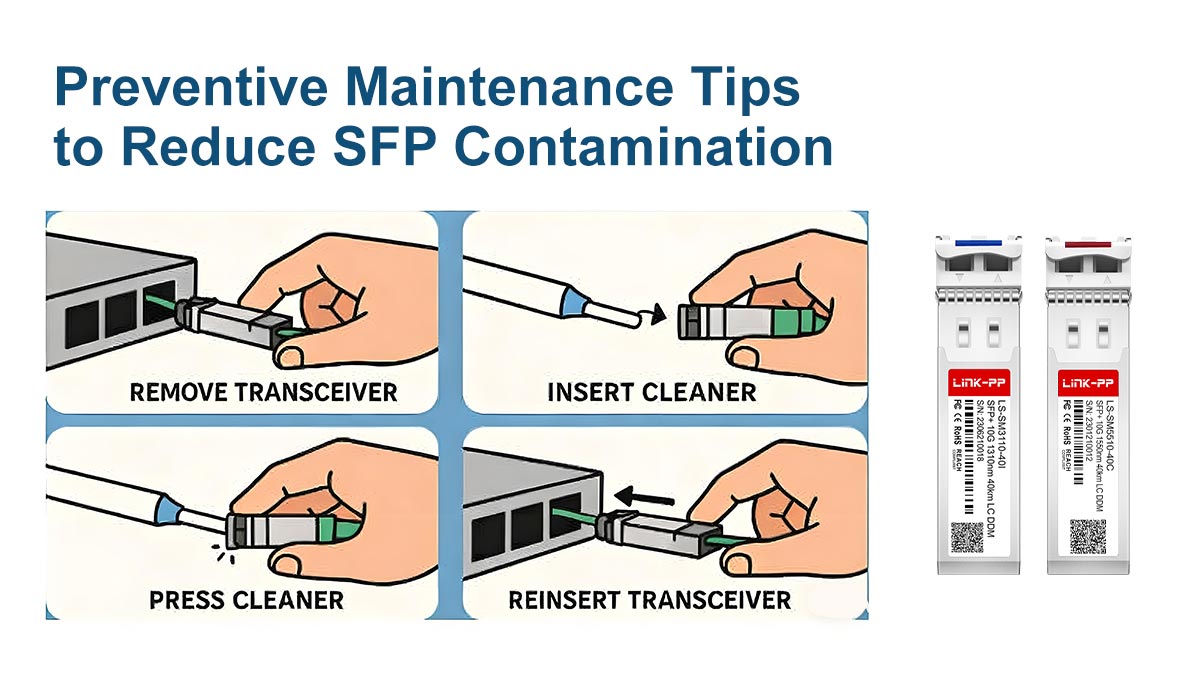
While cleaning an SFP transceiver is essential for restoring performance, preventive maintenance is even more important because it reduces how often cleaning is needed in the first place. In fiber optic environments, most contamination issues occur during handling, connection, and storage—not during operation.
By following proper preventive practices, you can significantly improve link stability and extend the lifespan of both SFP modules and fiber connectors.
Use of Dust Caps
Dust caps are the first line of defense against contamination.
Best practices:
Always install dust caps on:
Unused SFP transceivers
Disconnected fiber patch cords
Open equipment ports
Store dust caps in a clean environment when not in use
Why this matters:
Prevents airborne dust from settling on the optical end-face
Reduces the need for frequent cleaning
Protects against accidental physical contact
Even short exposure without dust caps can introduce microscopic contamination that impacts performance.
Clean-Before-Connect Principle
One of the most important industry practices is:
Always clean before every connection.
This applies to both:
Fiber patch cords
SFP optical ports
Why it is necessary:
A single contaminated connector can immediately contaminate a clean interface
Even “new” or “unused” connectors may carry factory dust or storage residue
Guidelines from IEC emphasize inspection and cleaning before mating optical interfaces to ensure compliance with optical performance standards.
Proper Handling and Storage
Incorrect handling is a major source of contamination.
Recommended practices:
Handle fiber connectors only by the housing, not the ferrule
Avoid touching optical surfaces at all times
Store SFP modules in anti-static, dust-free packaging
Keep fiber cables loosely coiled to avoid stress or micro-damage
Environmental considerations:
Store in low-dust, low-humidity environments
Avoid placing connectors on open surfaces or workbenches
Proper handling significantly reduces the risk of oil, dust, and mechanical damage.
Minimizing Repeated Insertions
Frequent plugging and unplugging increases the risk of contamination and wear.
Risks of repeated insertion:
Mechanical wear on ferrules and sleeves
Increased chance of dust ingress
Higher probability of micro-scratches over time
Best practices:
Avoid unnecessary reconnecting of fiber links
Use proper cable management to reduce movement
Plan network layouts to minimize physical changes
In stable network environments, reducing connector cycles can significantly extend optical interface lifespan.
👉 Preventive maintenance is more effective than corrective cleaning.
By consistently applying:
Dust protection
Clean-before-connect discipline
Proper handling and storage
Reduced connector cycling
you can minimize contamination risk, improve network reliability, and significantly reduce maintenance workload over time.
💡 When Cleaning Is Not Enough: Troubleshooting SFP Issues
Although cleaning is one of the most effective first-line maintenance actions for optical networks, it is not a universal solution. In some cases, persistent performance issues may indicate that the problem is no longer related to contamination, but rather hardware degradation or system-level faults.
Understanding how to distinguish between these scenarios is critical to avoid unnecessary cleaning cycles or incorrect module replacement.
Identifying Contamination vs Hardware Failure
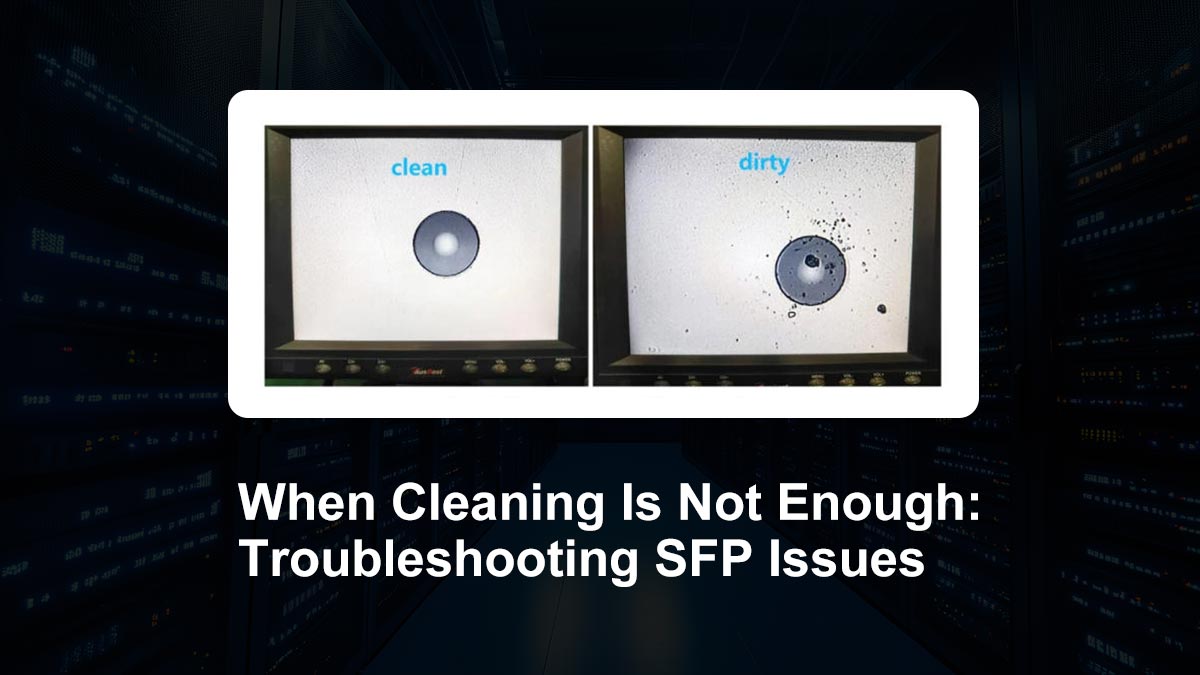
A key diagnostic challenge in fiber optic maintenance is determining whether the issue is caused by dirty optical interfaces or actual equipment failure.
Signs that point to contamination:
Intermittent signal degradation that improves after cleaning
Visible dust, oil, or residue on end-face inspection
Performance fluctuates after reconnecting fibers
Issues resolve temporarily after re-seating connectors
Signs that suggest hardware failure:
Persistent issues even after thorough cleaning
No visible contamination under microscope inspection
Module fails across multiple ports or cables
Internal optical components show instability or degradation
A proper diagnosis should always begin with inspection and controlled cleaning, but should not end there if symptoms persist.
Symptoms: CRC Errors, Link Drops, and High Attenuation
In real-world networks, SFP-related issues often present through measurable performance symptoms:
CRC Errors (Cyclic Redundancy Check Errors)
Indicate corrupted data transmission
Often caused by poor optical signal quality or interference
Link Drops or Flapping
Connection repeatedly goes up and down
Can be caused by marginal optical power levels or unstable alignment
High Optical Attenuation
Reduced signal strength across the fiber link
May result from contamination, bent fiber, or aging components
These symptoms are commonly associated with contamination, but they are not exclusive to it. Therefore, further verification is required before concluding root cause.
When to Replace vs When to Clean
A structured decision approach helps prevent unnecessary replacement costs and downtime.
✅ Clean First When:
Contamination is visible under inspection
Issue improves after cleaning
Problem is isolated to a single connection point
System is otherwise stable
❌ Consider Replacement When:
Issues persist after repeated cleaning cycles
No contamination is visible on optical surfaces
SFP fails across multiple tested environments
Optical power levels are consistently abnormal
Guidelines aligned with structured fiber practices from TIA emphasize that cleaning should be the first corrective step—but not the only diagnostic action when failures persist.
👉 Cleaning resolves contamination-related issues—but not hardware faults.
A professional troubleshooting workflow should always follow this logic:
Inspect → Clean → Test → Evaluate → Replace (if necessary)
By correctly distinguishing between contamination and hardware failure, engineers can reduce downtime, avoid unnecessary replacements, and ensure more reliable long-term network performance.
💡 Industry Best Practices and Standards for Fiber Cleaning
Professional fiber optic maintenance is not based on guesswork—it follows well-established international standards and repeatable engineering workflows. These best practices are designed to ensure consistent optical performance, minimize connector damage, and reduce network failure rates caused by contamination.
Among all principles, the most critical is the inspection-first methodology, supported by globally recognized standards such as IEC 61300-3-35 and structured cabling guidelines such as TIA-568.
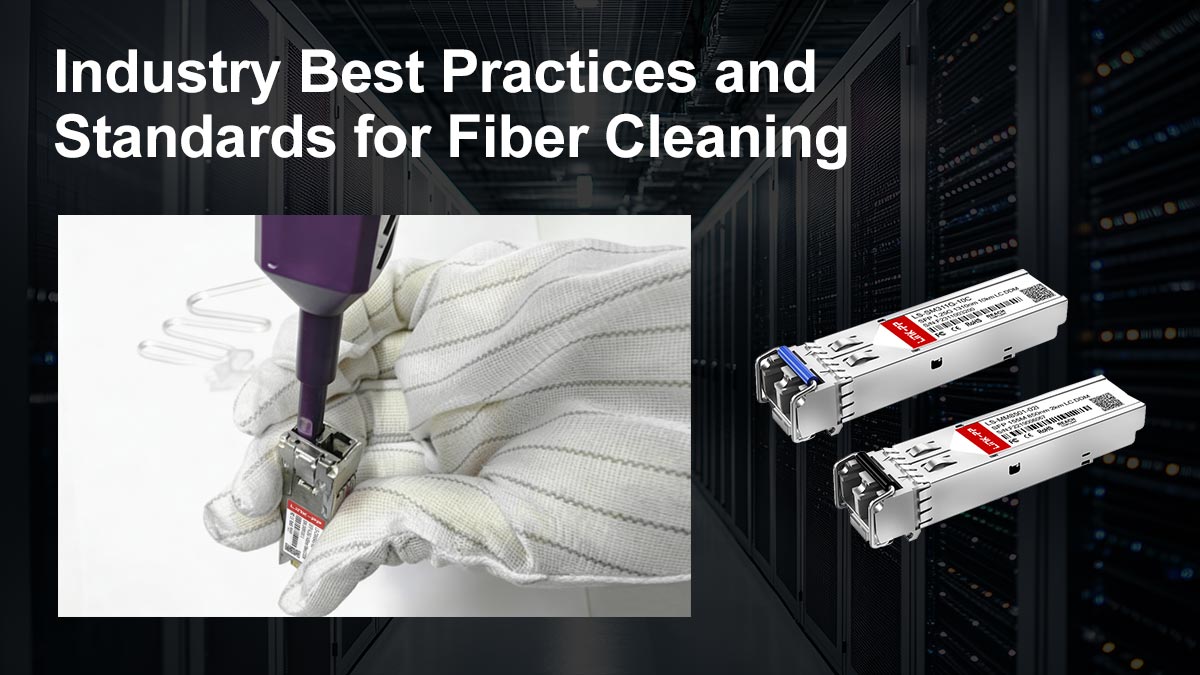
Inspection-First Methodology (The Core Principle)
Before any cleaning is performed, the optical interface must be inspected. This approach ensures that cleaning is only performed when necessary and that the correct cleaning method is selected.
Why inspection is essential:
Prevents unnecessary cleaning cycles that can wear down connectors
Identifies contamination type (dust, oil, residue, or scratches)
Detects permanent damage that cleaning cannot fix
Improves troubleshooting accuracy in network diagnostics
👉 In professional environments, inspection is not optional—it is mandatory before intervention.
IEC 61300-3-35 Standard: Connector End-Face Quality
The IEC 61300-3-35 defines internationally accepted criteria for fiber end-face inspection.
Key contributions of the standard:
Defines acceptable contamination limits on fiber end-faces
Classifies defects in different zones (core, cladding, adhesive area)
Provides pass/fail criteria for connector cleanliness
Ensures consistency across manufacturers and operators
👉 This standard is widely used in data centers, telecom networks, and fiber manufacturing environments to ensure optical reliability.
TIA-568 Standard: Structured Cabling Best Practices
The TIA-568 defines requirements for structured cabling systems, including fiber optic installations.
Relevance to fiber cleaning:
Emphasizes proper installation and maintenance of fiber links
Supports clean connection practices to maintain signal integrity
Encourages standardized procedures for network reliability
Helps ensure interoperability across different vendors and systems
👉 While not a cleaning manual, TIA-568 reinforces the importance of maintaining clean optical interfaces as part of overall system performance.
The “Inspect → Clean → Inspect” Workflow
The most widely accepted operational procedure in fiber optic maintenance is:
👉 Inspect → Clean → Inspect
1. Inspect
Use a fiber inspection microscope
Identify contamination type and severity
Determine whether cleaning is required
2. Clean
Apply appropriate method:
Dry cleaning (first choice)
Wet cleaning (if necessary)
Use correct tools for the connector type
3. Inspect Again
Verify cleanliness after cleaning
Confirm no new debris or residue introduced
Approve connector for reconnection
Why This Workflow Matters
This structured process ensures:
Reduced risk of over-cleaning
Higher network reliability
Lower maintenance costs
Standardized engineering practices across teams
It is widely adopted in both telecom operators and data center maintenance workflows because it minimizes human error and maximizes repeatability.
👉 Fiber cleaning is not a manual action—it is a controlled engineering process governed by international standards.
By following:
Inspection-first methodology
IEC 61300-3-35 compliance principles
TIA-568 structured cabling guidelines
The “Inspect → Clean → Inspect” workflow
engineers can ensure consistent optical performance, minimize connector damage, and significantly improve long-term network stability.
💡 Reliable SFP Performance Starts with Proper Cleaning
SFP transceivers are precision optical components, and their performance depends heavily on the cleanliness of their optical interfaces. As demonstrated throughout this guide, even microscopic contamination—such as dust, oil, or residue—can significantly impact signal quality, increase bit error rates, and lead to unstable or intermittent network connections.
The key takeaway is simple: most “hardware failures” in fiber networks are actually cleaning problems in disguise. By applying a structured and standardized cleaning process, network engineers can prevent unnecessary module replacements and significantly improve system reliability.
Contamination directly affects insertion loss, BER, and link stability
Proper cleaning requires the right tools and correct procedures—not force
Inspection is mandatory before and after cleaning
The safest workflow is: Inspect → Clean → Inspect
Preventive maintenance (dust caps, proper handling) reduces long-term issues
Not all faults are cleaning-related—diagnosis is essential before replacement
Final Recommendation
For consistent optical performance in data centers, telecom networks, and enterprise systems, cleaning should be treated as a standard maintenance and diagnostic procedure, not an occasional corrective action. Following industry practices aligned with IEC 61300-3-35 and structured cabling principles from TIA-568 ensures long-term reliability and reduces operational risk.
If you want to ensure long-term stability and low-loss performance in your fiber and high-speed networking systems, choosing high-quality, contamination-resistant interconnect components is just as important as proper cleaning practices.
👉 Visit the LINK-PP Official Store to explore reliable optical Modules solutions designed for data centers, enterprise networks, and telecom applications.
By combining proper maintenance practices with high-quality hardware, you can significantly reduce downtime, minimize signal degradation, and improve overall network reliability.



